
How to Use VeloFill with Mistral AI
Learn how to connect VeloFill to Mistral's high-performance language models. This guide covers creating an API key on La Plateforme, configuring VeloFill, and optimizing your setup.

VeloFill is designed for flexibility, allowing you to connect to any OpenAI-compatible large language model. While many users start with OpenAI, Mistral AI has emerged as a powerful and cost-effective alternative, offering a range of high-performance models suitable for any form-filling task. It takes just a few minutes to grab a key from the Mistral La Plateforme console and point the VeloFill browser extension at the Mistral API endpoint for fast, privacy-conscious form automation.
This guide will walk you through creating a Mistral API key, choosing the right model, and connecting it to VeloFill.
Why Choose Mistral AI for VeloFill?
Connecting VeloFill to Mistral gives you access to cutting-edge models with several key advantages:
- A Premier European Alternative: As a Paris-based company, Mistral AI provides a leading European alternative in the AI space, which can be a crucial factor for organizations prioritizing data privacy and regional technology ecosystems.
- Excellent Performance and Cost: Mistral’s models are renowned for their speed and strong reasoning capabilities. This translates to faster, more accurate form analysis in VeloFill, often at a competitive price point.
- Powerful Open-Source Models: Mistral is also famous for its powerful open-source models. For maximum privacy and control, you can run these models locally on your own hardware using tools like Ollama. To learn how, see our guide on running VeloFill with Ollama.
Choosing the Right Mistral Model
The Model ID you select in VeloFill determines the engine that will analyze your forms. Choosing the right one is a balance of speed, cost, and intelligence.
mistral-large-latest: This is Mistral’s flagship model. Choose it for maximum accuracy, especially on complex, multi-page forms or forms with non-standard field labels. It also has top-tier reasoning for interpreting nuanced instructions in your Knowledge Base. See the official model catalog for the latest availability and pricing notes.mistral-small-latest: This model offers a fantastic balance of performance and cost. It’s significantly faster and more affordable, making it ideal for high-volume, everyday tasks like filling out contact forms, logins, or simple applications.open-mistral-7b: This is a highly efficient and capable model that provides a very low-cost option for basic form-filling tasks.
Prerequisites
- A Mistral AI account with access to La Plateforme.
- The VeloFill extension installed in a compatible browser (Chrome, Edge, or Firefox).
Step 1: Get Your Mistral API Key
Your API key is how VeloFill authenticates with Mistral’s services.
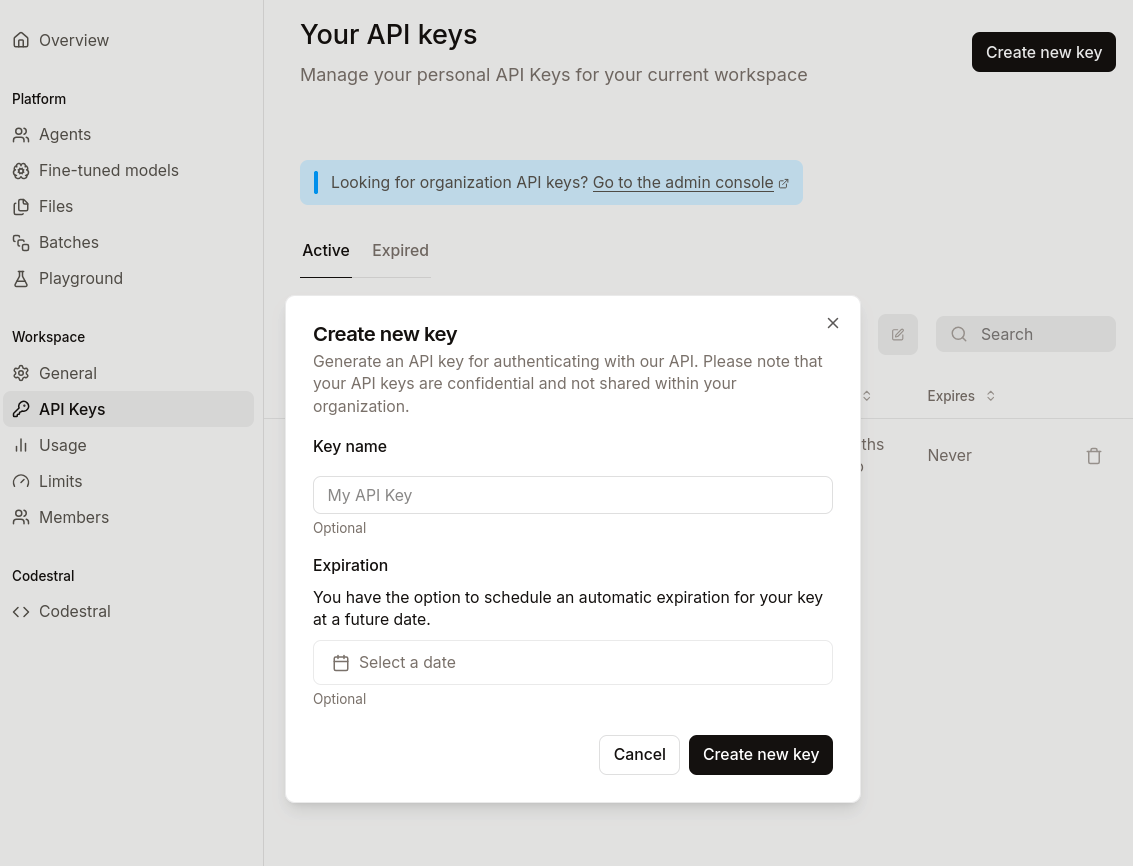
- Sign in to the Mistral La Plateforme dashboard.
- Navigate to API Keys from the left-hand menu.
- Click Create new key.
- Give the key a descriptive name, such as
VeloFill Extension, so you can easily identify its purpose later. - Copy the generated key immediately. For security reasons, Mistral will only show it to you once.
⚠️ Treat your API key like a password. Store it in a secure password manager or secrets vault. Never share it publicly or commit it to a git repository.
Step 2: Connect VeloFill to Mistral
Because Mistral uses an API structure that is compatible with OpenAI, you can connect it via VeloFill’s flexible custom endpoint option. This allows VeloFill to support a wide range of providers beyond its built-in options.
- Open the VeloFill extension’s options page and navigate to LLM Provider.
- Choose OpenAI-compatible / Custom endpoint from the provider dropdown.
- In the Endpoint URL field, enter Mistral’s API endpoint:
https://api.mistral.ai/v1. - Paste the API key you created in the previous step into the API Key field.
- In the Model ID field, enter the name of the model you chose earlier, such as
mistral-large-latest. - Click Save.
Step 3: Test Your Mistral Connection
Before tackling production workflows, confirm that the integration works end-to-end.
- Open a simple web form, such as a contact or newsletter signup form.
- Activate VeloFill and select the form so the extension can analyze the fields.
- After the fill completes, review the results and adjust any Knowledge Base entries if the output needs refinement.
- If VeloFill reports an error or the fill looks incomplete, follow the troubleshooting steps below.
Troubleshooting FAQ
After saving your configuration, it’s best to test it on a simple form. If you run into issues, here are the most common solutions:
-
How do I fix a 401 Unauthorized error in VeloFill?
- Solution: Your API key is likely incorrect or has been revoked. Go back to La Plateforme, generate a new key, and paste it carefully into the VeloFill settings.
-
What if VeloFill shows 404 Not Found or Model Not Found?
- Solution: The Model ID you entered is incorrect or not available to your account. Double-check for typos (e.g.,
mistral-large-latest) and confirm the model name in the Mistral documentation.
- Solution: The Model ID you entered is incorrect or not available to your account. Double-check for typos (e.g.,
-
Why do I see Failed to Fetch or Connection Error?
- Solution: This usually points to an incorrect Endpoint URL. Ensure it is exactly
https://api.mistral.ai/v1. Also, check for any firewall, VPN, or network issues that might be blocking the connection.
- Solution: This usually points to an incorrect Endpoint URL. Ensure it is exactly
-
What should I do if the form fills incorrectly or not at all?
- Solution: If there are no error messages, the model might be struggling with the form’s complexity. First, try a more powerful model (e.g., switch from
mistral-small-latesttomistral-large-latest). Second, refine the content in your VeloFill Knowledge Base to be more explicit.
- Solution: If there are no error messages, the model might be struggling with the form’s complexity. First, try a more powerful model (e.g., switch from
Keep Learning
With VeloFill now connected to Mistral, you’re ready to automate your workflows with a new level of power and efficiency.
Related reading

How to Use VeloFill with Claude (Anthropic)
A complete tutorial for using Claude models with VeloFill. Learn three ways to connect: OpenRouter for quick setup, direct Anthropic API for full features, or LiteLLM proxy for team deployments.
Read more →
How to Use VeloFill with Z.ai's GLM Models
A step-by-step guide to connecting the VeloFill browser extension to Z.ai's powerful and cost-effective large language models, including the flagship GLM-4.6 and the lightweight GLM-4.5-Air.
Read more →
Run VeloFill with Ollama and Gemma 3
Spin up Gemma 3 through Ollama, point VeloFill at your localhost endpoint, and keep sensitive data inside your network.
Read more →Need a guided walkthrough?
Our team can help you connect VeloFill to your workflows, secure API keys, and roll out best practices.